On this page
Page provides a consistent layout shell for application pages, including navigation aids, a title, page-level actions, and a content area.
- Overview
- Rules and guidance
- Properties
- Styles
- Accessibility
When to use
- As the outermost layout wrapper for every application page, including dashboards, task flows, and informational views
- Whenever a page needs a consistent title, back navigation, breadcrumbs, or page-level actions
When not to use
- For marketing or landing pages - page is designed for authenticated application views with a standard structure. Use a custom layout instead.
- Inside a modal - content inside a Modal should not use the Page wrapper.
Anatomy
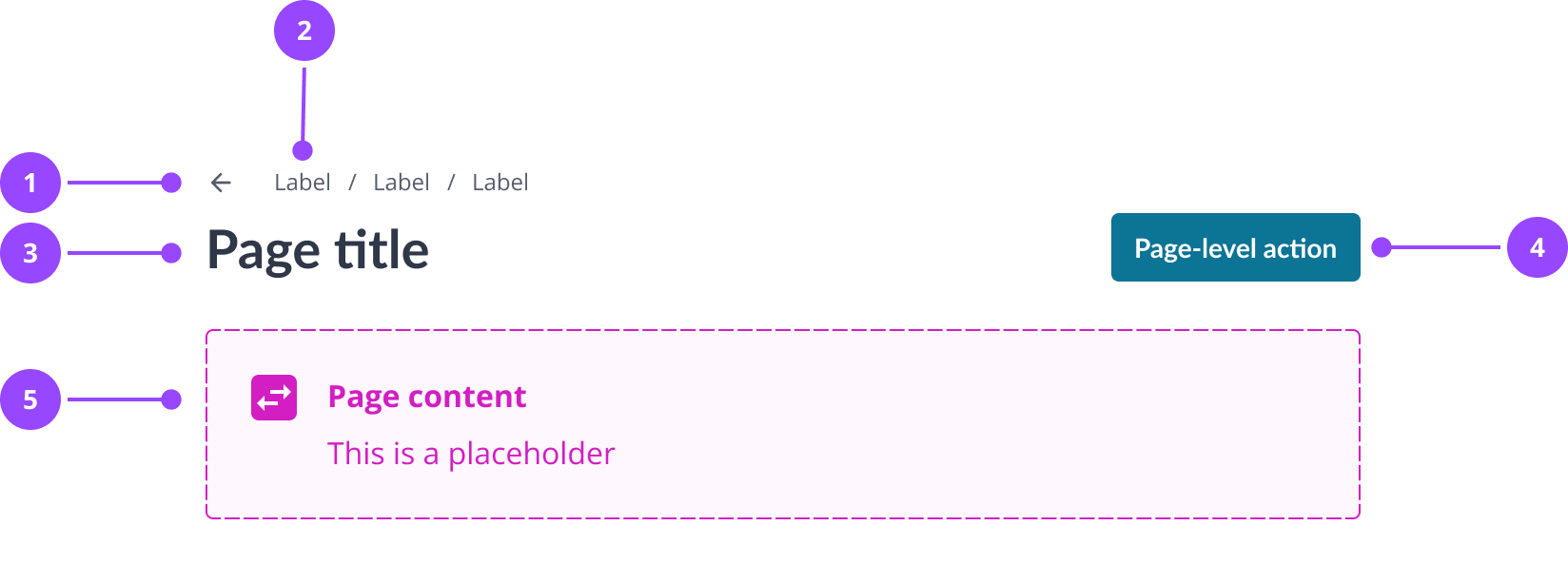
- Waymarkers (navigation aids placed above the title; contains the back link and breadcrumbs)
- Back link (an icon link that navigates to the previous page)
- Breadcrumbs (a text trail showing the current page's position in the hierarchy)
- Header section (a flex row containing the title and page actions; stacks vertically on narrow viewports)
- Title (the page's h1 heading)
- Actions (page-level buttons displayed to the right of the title on wider viewports)
- Content (the main body of the page)
Basic usage
Compose the sub-components inside Page in the order that matches the anatomy above.
Edit live code
<Page>
  <Page.Header>
    <Page.Waymarkers>
      <Page.BackLink href="/" />
      <Page.Breadcrumbs breadcrumbs={[
        'Payments and refund',
        'Transactions history'
      ]} />
    </Page.Waymarkers>
    <Page.HeaderSection>
      <Page.Title>Transactions history</Page.Title>
      <Page.Actions>
        <PrimaryCTAButton>Add transaction</PrimaryCTAButton>
      </Page.Actions>
    </Page.HeaderSection>
  </Page.Header>
  <Page.Content>
    <P>Page content</P>
  </Page.Content>
</Page>
Variants and features
Max width
By default, Page centres its content and constrains it to a maximum width of 160rem. Set maxWidth="none" to allow the content to fill the available width. Use this for pages that intentionally use full-width layouts, such as dashboards with wide data tables.
Edit live code
<Page maxWidth="none">
  <Page.Header>
    <Page.HeaderSection>
      <Page.Title>Transactions history</Page.Title>
    </Page.HeaderSection>
  </Page.Header>
  <Page.Content>
    <P>This content fills the available width instead of being constrained to 160rem.</P>
  </Page.Content>
</Page>
Breadcrumbs
Use Page.Breadcrumbs to show the current page's position within a hierarchy. Pass an array of strings as the breadcrumbs prop. The current page is not included. Breadcrumbs show the path to the current page, not the current page itself. The slash separator between items is added automatically and hidden from screen readers.
Include breadcrumbs whenever the page has a parent page in the information architecture.
Edit live code
<Page>
  <Page.Header>
    <Page.Waymarkers>
      <Page.BackLink href="/" />
      <Page.Breadcrumbs breadcrumbs={[
        'Payments and refund',
        'Transactions history'
      ]} />
    </Page.Waymarkers>
    <Page.HeaderSection>
      <Page.Title>Transactions history</Page.Title>
    </Page.HeaderSection>
  </Page.Header>
  <Page.Content>
    <P>Page content</P>
  </Page.Content>
</Page>
Back link
Use Page.BackLink to provide a single icon link that navigates to the previous page. It renders an arrow-left icon with a visually hidden "Back" label for screen readers.
Use the back link when the user is in a non-sequential flow and needs a quick way to return to a parent page. Avoid back links in multi-step forms, where back navigation should be handled by the form's own step controls, except on the first step where a back link to the previous page outside the form is appropriate.
Edit live code
// Example only - always use within the Page component.
<Page.Waymarkers>
  <Page.BackLink href="/" />
</Page.Waymarkers>
Page title
Page.Title renders the page's h1. It must be the only h1 on the page. The title must not end with a full stop or exclamation mark.
Page actions
Use Page.Actions to place page-level controls to the right of the page title. Actions are spaced using the betweenButtons token and wrap using the Cluster layout.
A page must not have more than one primary action. One secondary action may accompany it. Do not combine a primary page action with another primary button in the page content, as this creates competing calls to action.
Edit live code
<Page>
  <Page.Header>
    <Page.Waymarkers>
      <Page.Breadcrumbs breadcrumbs={[
        'Payments and refund',
        'Transactions history'
      ]} />
    </Page.Waymarkers>
    <Page.HeaderSection>
      <Page.Title>Transactions history</Page.Title>
      <Page.Actions>
        <PrimaryCTAButton>Add transaction</PrimaryCTAButton>
      </Page.Actions>
    </Page.HeaderSection>
  </Page.Header>
  <Page.Content>
    <P>Page content</P>
  </Page.Content>
</Page>
Combining waymarkers
Back link and breadcrumbs can be used together in Page.Waymarkers when both are needed.
Edit live code
// Example only - always use within the Page component.
<Page.Waymarkers>
  <Page.BackLink href="/" />
  <Page.Breadcrumbs breadcrumbs={[
    'Payments and refund',
    'Transactions history'
  ]} />
</Page.Waymarkers>
usage
- Page should be the outermost layout wrapper for every authenticated application pageConsistent use of Page across all views gives users a predictable layout and reduces bespoke layout code.Copy rule ID for page.use-as-outermost-wrapper
- Page.BackLink should not be used on steps within a multi-step formBack navigation in a multi-step form should be controlled by the form's own step controls to preserve form state and sequence.Exception: the back link is on the first step, where it may be appropriate to navigate awayCopy rule ID for page.back-link.not-in-multistep-form
- Page should not be used for marketing or landing pagesPage enforces application layout conventions that are not appropriate for promotional content.Copy rule ID for page.no-marketing-pages
placement
- Page.Waymarkers must be placed inside Page.Header and above Page.HeaderSectionNavigation aids must come before the title in source order so screen reader users encounter them in the correct sequence.Copy rule ID for page.waymarkers-before-header-section
- Page.HeaderSection should contain Page.Title before Page.ActionsTitle first gives screen readers and keyboard users the page name before reaching the actions.Copy rule ID for page.header-section-order
content
- Page.Title must clearly describe the purpose of the pageCopy rule ID for page.title.describes-page
- Page.Title must not end with a full stop or exclamation markCopy rule ID for page.title.no-punctuation
- Page.Breadcrumbs must not include the current page in the breadcrumbs arrayThe current page is represented by the Page.Title. Repeating it in the breadcrumb trail creates redundancy.Copy rule ID for page.breadcrumbs.excludes-current
- Page.Title should use sentence caseTitle case is inconsistent with the Kaluza content style and harder to read.Copy rule ID for page.title.sentence-case
- If the page displays information rather than prompting an actionPage.Title should use a noun or noun phrase for informational pages'Payment history' or 'Account summary' describes what the user can see.Copy rule ID for page.title.informational-noun
- If the page prompts the user to complete a taskPage.Title should use a verb-noun phrase for task pages'Make a payment' or 'Add meter reading' makes the user's goal explicit.Copy rule ID for page.title.task-verb-noun
composition
- Page will render as an HTML main element by default. The as prop overrides this when a different element is requiredCopy rule ID for page.renders-as-main
- Page will wrap its children in a Stack with betweenCards spacing automatically. Direct children do not need their own vertical spacing appliedCopy rule ID for page.stack-wraps-children
- Page.Title must be included on every pageEvery page must have a visible h1 for screen readers to announce and for users to orient themselves. An absent h1 is an accessibility failure.Copy rule ID for page.title-required
- Page.Title must be the only h1 on the pageMultiple h1 elements break the document outline and confuse screen reader navigation.Copy rule ID for page.title-is-h1
- Page.Actions must not contain more than one primary actionMultiple primary actions dilute emphasis and leave users uncertain about the main task.Copy rule ID for page.actions.max-one-primary
- Page.Breadcrumbs should be included when the page has a parent page in the information architectureBreadcrumbs orient users and provide a secondary navigation path back through the hierarchy.Copy rule ID for page.breadcrumbs.if-has-parent
- Page.Content should be used to wrap the main body of the pagePage.Content marks the boundary of the page body for styling and future extension. Placing content directly inside Page bypasses this.Copy rule ID for page.content-in-page-content
- Page.Actions primary button should not appear on a page that already contains a primary CTA Button in the content areaCompeting primary actions create visual and cognitive ambiguity about what the user should do next.Copy rule ID for page.actions.no-competing-primary
Page
Also accepts all props from HTMLAttributes.
| Name | Type | Default | Required | Description |
|---|---|---|---|---|
maxWidth | none standard | 'standard' | No | `'standard'` caps the page width at `160rem` and centres it; `'none'` lets it fill its container. |
as | ElementType | — | No | Renders the page as a different element, e.g. `as="section"`. |
forwardedAs | ElementType | — | No | Like `as`, but passed on to the component being wrapped. |
BackLink
This component has no props of its own.
Breadcrumbs
Also accepts all props from HTMLAttributes.
| Name | Type | Default | Required | Description |
|---|---|---|---|---|
breadcrumbs | string[] | — | Yes | Labels of the breadcrumbs in order, shown as plain text separated by slashes. |
Styles
back-link
Defined in Page/BackLink.tsx
text-decoration: none;
font-weight: inherit;
display: inline-flex;
align-items: center;
justify-content: center;
width: ${space[6]};
height: ${space[6]};
color: ${colors.body};
border-radius: ${radii.standard};

&:focus-visible {
  ${focusRing}
}

&:hover {
  background: ${colors.primaryMuted};
}
breadcrumb
Defined in Page/Breadcrumbs.tsx
font-family: ${fonts.body};
line-height: ${lineHeights.small};
font-weight: ${fontWeights.normal};
color: ${colors.body};
font-size: ${responsiveFontSizes.small[0]};
white-space: nowrap;

${mediaQueries.smallAndUp} {
  font-size: ${responsiveFontSizes.small[1]};
}

&:not(:first-child):before {
  content: '/' / '';
  margin-right: ${space[2]};
}
page
Defined in Page/Page.tsx
width: ${maxWidth === 'standard' ? '160rem' : 'initial'};
max-width: 100%;
margin: 0 auto;
page-header-section
Defined in Page/PageHeader.tsx
display: flex;
gap: ${space[2]};
justify-content: space-between;
align-content: flex-start;
flex-direction: column;

${mediaQueries.smallAndUp} {
  flex-direction: row;
}
In brief
Page is the main landmark of a screen. A screen reader announces the page title as a level 1 heading, and the back link as a link named "Back".
What Nebula provides
- Page renders a main landmark and Page.Title renders an h1.
- Page.BackLink is a native link with a visible focus ring. Its arrow icon is hidden from screen readers and the link is named "Back".
- Page.Breadcrumbs is an ordered list, and its slash separators are hidden from screen readers.
Keyboard behaviour
The page itself is not a tab stop. The back link is a native link reached with Tab, and the page actions and content are the controls you place in them.
Interactions
- Tab - Moves focus to the back link, then to the controls in the page actions and content
Accessible design
Write a page title that says what the page is for
The title is the level 1 heading, and often the first thing a screen reader user hears. Make it specific, so two pages never share one.
WCAG: 2.4.6 Headings and Labels
Don't rely on breadcrumbs to move around
The breadcrumbs are plain text, not links, so they say where the page is without taking the user anywhere. Keep the back link, or the main navigation, as the way back.
Accessible development
Always pass an href to Page.BackLink
Without one, the link points at the current page and reloads it. Give it the page it goes back to, so "Back" has a destination.
WCAG: 2.4.4 Link Purpose (In Context)
Never put a Page inside another main
Page is the main landmark, and a page has one. If it sits inside the layout of an app that already has one, render it as another element, for example as="section".
WCAG: 1.3.1 Info and Relationships
Avoid a second h1 in the page content
Page.Title already renders the level 1 heading, so start the headings in the content at level 2.
WCAG: 1.3.1 Info and Relationships
Accessibility testing status
Reviewed on 9 October 2026 against v17.0.1.
| Test | Status | Tested with |
|---|---|---|
| Default state | Tested | axe-core via the Storybook test runner (CI) |
| Advanced states | Partially tested | axe-core via the Storybook test runner (CI) |
| Keyboard navigation | Manually tested | keyboard (reported by the owner) |
| Screen reader | Partially tested | VoiceOver with Chrome (reported by the owner) |
What these tests and statuses mean
The table records which checks were run on this component on its own. It is not a statement of WCAG conformance, and it does not cover how the component is used.
The tests
- Default state: The component as it first appears, before anything is clicked or changed.
- Advanced states: Every other state and variant: error, open, selected, each size and style, and hovering.
- Keyboard navigation: Whether every function can be reached and used with the keyboard alone, with a visible focus ring.
- Screen reader: Whether a screen reader announces what is on screen correctly: the name, the role and any state.
The statuses
- Tested: Every check in this row passed in an automated run that repeats on every pull request.
- Manually tested: Every check in this row was run once, by a person or with a tool they started, and all of them passed. It is not re-run on every change.
- Partially tested: Some checks in this row were run once and passed; the rest are still to do.
- Issue found: A check in this row failed. The ticket is shown beside the status.
- Not tested: No check in this row has been run yet.
- Not applicable: This row does not apply to the component, for the reason given beside it.