On this page
CTA Button
Trigger actions on the current page.
- Overview
- Rules and guidance
- Properties
- Styles
- Accessibility
When to use
- To trigger an action that happens on the current page, such as submitting a form, saving changes, or confirming a decision
- As the primary call to action in a section or page
- To confirm or cancel a destructive operation
When not to use
- To navigate to another URL - use CTA Link instead. Buttons trigger actions; links go somewhere.
- For inline text actions within a paragraph - use Text Link instead. A button in running text disrupts reading flow.
Anatomy
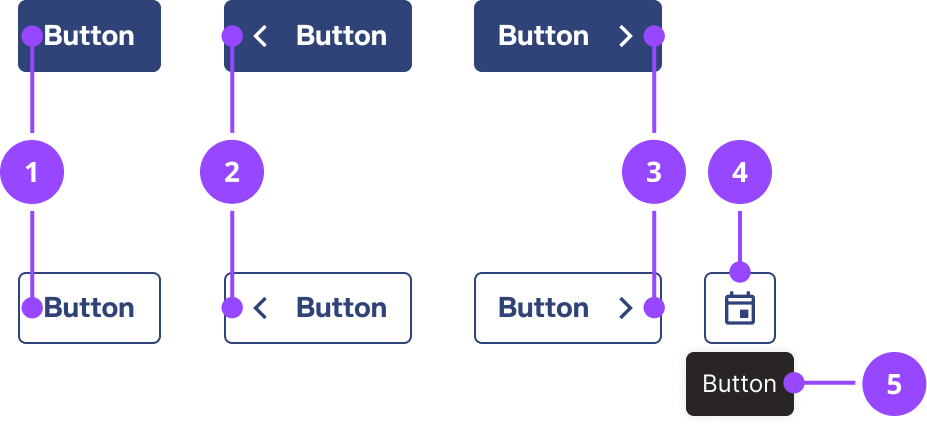
- Button label: descriptor of the action that will be performed when pressed, for example "Submit"
- Icon left: icon to the left of the text label to improve understanding and functionality
- Icon right: icon to the right of the text label to improve understanding and functionality
- Icon only: icon used on the button without a visible text label
- Icon only text label: accompanying text label visible on hover and focus
Basic usage
Edit live code
<CTAButton variant="primary">Plant a Tree</CTAButton>
Variants and features
Primary
Use for the main action on a page or in a section. There should be at most one primary button per section.
Edit live code
<PrimaryCTAButton>Plant a Tree</PrimaryCTAButton>
Secondary
Use for supporting actions that sit alongside a primary button, such as "Cancel" next to "Save", or "Back" next to "Next".
Edit live code
<SecondaryCTAButton>Tell me more about trees</SecondaryCTAButton>
Tertiary
Use for low-emphasis actions that are available but not the focus of the page, such as an optional link to further reading or a secondary escape route alongside a primary and secondary button pair.
Edit live code
<TertiaryCTAButton>Skip for now</TertiaryCTAButton>
Destructive
Use when the action is irreversible, such as deleting an account, removing a payment method, or cancelling a service. This variant signals to the user that the action carries significant consequences.
Use the filled variant (DestructiveCTAButton) for a single high-prominence destructive action. Use the outlined variant (DestructiveSecondaryCTAButton) when the destructive action sits alongside another button. Use the low-emphasis variant (DestructiveTertiaryCTAButton) when the destructive action needs to be available but not visually dominant.
Edit live code
<DestructiveCTAButton>Delete account</DestructiveCTAButton>
Edit live code
<DestructiveSecondaryCTAButton>Cancel service</DestructiveSecondaryCTAButton>
Edit live code
<DestructiveTertiaryCTAButton>Remove payment method</DestructiveTertiaryCTAButton>
Icons
Add an icon to the left or right of the label to reinforce meaning. Use iconLeft for icons that categorise or contextualise the action, and iconRight for icons that indicate direction or continuation.
A right-pointing chevron (iconRight="chevron-right") signals that the journey continues on the next step rather than completing. Use it consistently across multi-step flows.
Edit live code
<PrimaryCTAButton iconRight="chevron-right">Next</PrimaryCTAButton>
Edit live code
<SecondaryCTAButton iconLeft="download">Download report</SecondaryCTAButton>
Icon only
Use the icon prop to show an icon instead of a label, for compact contexts such as a table row or toolbar. The children become the button's tooltip and accessible name, so always provide them.
icon takes precedence over iconLeft and iconRight, which are ignored. It has no effect on the primary and destructive variants, so use a secondary or tertiary variant.
Edit live code
<Cluster spaceBetween={2}>
  <ClusterItem>
    <SecondaryCTAButton icon="edit">Edit meter reading</SecondaryCTAButton>
  </ClusterItem>
  <ClusterItem>
    <TertiaryCTAButton icon="delete">Delete meter reading</TertiaryCTAButton>
  </ClusterItem>
</Cluster>
Full width
The fullWidth prop controls how the button sizes to its container:
- 'small' (default): full width below the smallest breakpoint, auto width above
- 'always': full width at all breakpoints
- 'never': always auto width
Edit live code
<PrimaryCTAButton fullWidth="always">Save changes</PrimaryCTAButton>
Small size
Use size="small" for compact contexts such as table rows, chips, or dense UI where the default button height (space.9) would be too large. The small variant uses space.6 height.
Edit live code
<PrimaryCTAButton size="small">Save</PrimaryCTAButton>
Loading state
Set loading to true when an async action is in progress. The button replaces its label with a spinner and becomes disabled automatically. Do not re-enable the button manually while it is in the loading state.
Edit live code
<PrimaryCTAButton loading={true}>Save</PrimaryCTAButton>
Content guidance
Write button labels that describe exactly what happens when the button is pressed. Vague labels like "OK" or "Yes" make users pause to remember what they agreed to.
- Use sentence case: "Save changes", not "Save Changes"
- Use active language: start with a verb that describes the outcome ("Submit", "Download report", "Delete account")
- Each button on a page should have a unique label. If two buttons do the same thing in different contexts, add visually hidden text to distinguish them for screen reader users
- Avoid possessive pronouns: "Save account details" rather than "Save my account details"
- Use a right chevron icon to signal that the journey continues across steps, not that the action completes
Common patterns:
| Context | Label |
|---|---|
| Form submission | "Save changes", "Submit" |
| Multi-step flow | "Next", "Save & continue" |
| Destructive confirmation | "Delete account", "Cancel service" |
| Dismissal | "Cancel", "Go back" |
usage
- CTAButton must only be used to trigger actions, not to navigate to another URLButtons and links have distinct semantics. A button that navigates breaks screen reader expectations and violates WCAG 2.2 SC 4.1.2.Copy rule ID for ctabutton.action-not-navigation
- CTAButton destructive variant must only be used for actions that are irreversible or have significant consequencesThe destructive variant uses error colour semantics. Using it for ordinary actions desensitises users to genuine risk.Copy rule ID for ctabutton.destructive-variant-reserved
- CTAButton must not be used in place of a link when the action navigates to a URLUse CTALink instead. A button rendered as a link breaks keyboard navigation and screen reader announcement.Copy rule ID for ctabutton.no-link-in-button
- CTAButton primary variant should appear at most once per page sectionMultiple primary buttons compete for attention and dilute the call to action.Copy rule ID for ctabutton.one-primary-per-section
content
- CTAButton must always include a visible text labelIcon-only buttons lack accessible names and are ambiguous for all users. Use VisuallyHidden if a label must be hidden from sighted users.Copy rule ID for ctabutton.icon-alone-no-label
- CTAButton label must be unique within the page, or supplemented with visually hidden text to distinguish itDuplicate labels prevent screen reader users from distinguishing between buttons that perform different actions.Copy rule ID for ctabutton.label-unique
- CTAButton label should be written in sentence caseCopy rule ID for ctabutton.label-sentence-case
- CTAButton label should start with a verb that describes the outcome of pressing the buttonActive labels reduce hesitation and clarify the consequence of the action.Copy rule ID for ctabutton.label-active-language
- If used in a multi-step flow with a label like "Next" or "Save & continue"CTAButton should use iconRight="chevron-right" when the action advances to the next step of a multi-step flowA chevron signals continuation rather than completion, helping users understand they are still in a flow.Copy rule ID for ctabutton.chevron-right-journey-continues
- CTAButton icon should reinforce the label rather than repeat it or contradict itIcons used purely as decoration add noise. Icons that contradict the label create confusion.Copy rule ID for ctabutton.icon-reinforces-label
- CTAButton label should not use possessive pronouns such as "my" or "your"Possessive pronouns add length without adding clarity. "Save account details" is clearer than "Save my account details".Copy rule ID for ctabutton.label-no-possessive-pronouns
interaction
- If icon prop is set and variant is not primary or destructiveCTAButton will wrap icon-only secondary, tertiary, and destructive-secondary/tertiary variants in a TooltipTrigger, using children as the tooltip content and accessible nameThe icon prop is only honoured for non-primary and non-destructive variants. The component wraps the button in TooltipTrigger automatically so no separate tooltip wiring is needed.Copy rule ID for ctabutton.will-icon-only-tooltip
- CTAButton will set disabled automatically when loading is true. The component passes disabled={disabled || loading} to the underlying buttonCopy rule ID for ctabutton.loading-disabled
- CTAButton must not have its disabled state manually toggled while loading is trueThe loading prop sets disabled automatically. Overriding this can produce inconsistent visual and accessible states.Copy rule ID for ctabutton.loading-no-manual-disable
- CTAButton should retain the same label prop when loading is trueThe label is replaced visually by the spinner, but it remains the accessible name. Changing it mid-flight can confuse screen reader users.Copy rule ID for ctabutton.loading-label-unchanged
CTAButton
Also accepts all props from ButtonHTMLAttributes, HTMLAttributes.
| Name | Type | Default | Required | Description |
|---|---|---|---|---|
iconLeft | IconName | 'off' | (string & {}) | 'off' | No | Name of an icon to show before the label. Use `'off'` for no icon. |
iconRight | IconName | 'off' | (string & {}) | 'off' | No | Name of an icon to show after the label. Use `'off'` for no icon. |
loading | boolean | false | No | Shows a loading indicator in place of the content and disables the button. |
fullWidth | always never small | 'small' | No | When the button fills the width of its container. `'small'` means full width on small screens only. Ignored for icon-only buttons. |
variant | primary secondary tertiary destructive destructive-secondary destructive-tertiary | 'primary' | No | The visual style of the button. |
icon | IconName | (string & {}) | — | No | Name of an icon to show instead of the label, making an icon-only button. The `children` become its tooltip and accessible name. Takes precedence over `iconLeft` and `iconRight`, which are ignored. Ignored for the `primary` and `destructive` variants. |
size | default small | 'default' | No | The size of the button. |
as | ElementType | — | No | Renders the component as a different element or component, e.g. `as="section"`. |
forwardedAs | ElementType | — | No | Like `as`, but passed on to the component being wrapped, for when a styled wrapper should keep its own element and change the one beneath it. |
PrimaryCTAButton
Also accepts all props from ButtonHTMLAttributes, HTMLAttributes.
Always sets variant to 'primary', so passing it has no effect.
| Name | Type | Default | Required | Description |
|---|---|---|---|---|
iconLeft | IconName | 'off' | (string & {}) | 'off' | No | Name of an icon to show before the label. Use `'off'` for no icon. |
iconRight | IconName | 'off' | (string & {}) | 'off' | No | Name of an icon to show after the label. Use `'off'` for no icon. |
loading | boolean | false | No | Shows a loading indicator in place of the content and disables the button. |
fullWidth | always never small | 'small' | No | When the button fills the width of its container. `'small'` means full width on small screens only. Ignored for icon-only buttons. |
icon | IconName | (string & {}) | — | No | Name of an icon to show instead of the label, making an icon-only button. The `children` become its tooltip and accessible name. Takes precedence over `iconLeft` and `iconRight`, which are ignored. Ignored for the `primary` and `destructive` variants. |
size | default small | 'default' | No | The size of the button. |
as | ElementType | — | No | Renders the component as a different element or component, e.g. `as="section"`. |
forwardedAs | ElementType | — | No | Like `as`, but passed on to the component being wrapped, for when a styled wrapper should keep its own element and change the one beneath it. |
SecondaryCTAButton
Also accepts all props from ButtonHTMLAttributes, HTMLAttributes.
Always sets variant to 'secondary', so passing it has no effect.
| Name | Type | Default | Required | Description |
|---|---|---|---|---|
iconLeft | IconName | 'off' | (string & {}) | 'off' | No | Name of an icon to show before the label. Use `'off'` for no icon. |
iconRight | IconName | 'off' | (string & {}) | 'off' | No | Name of an icon to show after the label. Use `'off'` for no icon. |
loading | boolean | false | No | Shows a loading indicator in place of the content and disables the button. |
fullWidth | always never small | 'small' | No | When the button fills the width of its container. `'small'` means full width on small screens only. Ignored for icon-only buttons. |
icon | IconName | (string & {}) | — | No | Name of an icon to show instead of the label, making an icon-only button. The `children` become its tooltip and accessible name. Takes precedence over `iconLeft` and `iconRight`, which are ignored. Ignored for the `primary` and `destructive` variants. |
size | default small | 'default' | No | The size of the button. |
as | ElementType | — | No | Renders the component as a different element or component, e.g. `as="section"`. |
forwardedAs | ElementType | — | No | Like `as`, but passed on to the component being wrapped, for when a styled wrapper should keep its own element and change the one beneath it. |
TertiaryCTAButton
Also accepts all props from ButtonHTMLAttributes, HTMLAttributes.
Always sets variant to 'tertiary', so passing it has no effect.
| Name | Type | Default | Required | Description |
|---|---|---|---|---|
iconLeft | IconName | 'off' | (string & {}) | 'off' | No | Name of an icon to show before the label. Use `'off'` for no icon. |
iconRight | IconName | 'off' | (string & {}) | 'off' | No | Name of an icon to show after the label. Use `'off'` for no icon. |
loading | boolean | false | No | Shows a loading indicator in place of the content and disables the button. |
fullWidth | always never small | 'small' | No | When the button fills the width of its container. `'small'` means full width on small screens only. Ignored for icon-only buttons. |
icon | IconName | (string & {}) | — | No | Name of an icon to show instead of the label, making an icon-only button. The `children` become its tooltip and accessible name. Takes precedence over `iconLeft` and `iconRight`, which are ignored. Ignored for the `primary` and `destructive` variants. |
size | default small | 'default' | No | The size of the button. |
as | ElementType | — | No | Renders the component as a different element or component, e.g. `as="section"`. |
forwardedAs | ElementType | — | No | Like `as`, but passed on to the component being wrapped, for when a styled wrapper should keep its own element and change the one beneath it. |
DestructiveCTAButton
Also accepts all props from ButtonHTMLAttributes, HTMLAttributes.
Always sets variant to 'destructive', so passing it has no effect.
| Name | Type | Default | Required | Description |
|---|---|---|---|---|
iconLeft | IconName | 'off' | (string & {}) | 'off' | No | Name of an icon to show before the label. Use `'off'` for no icon. |
iconRight | IconName | 'off' | (string & {}) | 'off' | No | Name of an icon to show after the label. Use `'off'` for no icon. |
loading | boolean | false | No | Shows a loading indicator in place of the content and disables the button. |
fullWidth | always never small | 'small' | No | When the button fills the width of its container. `'small'` means full width on small screens only. Ignored for icon-only buttons. |
icon | IconName | (string & {}) | — | No | Name of an icon to show instead of the label, making an icon-only button. The `children` become its tooltip and accessible name. Takes precedence over `iconLeft` and `iconRight`, which are ignored. Ignored for the `primary` and `destructive` variants. |
size | default small | 'default' | No | The size of the button. |
as | ElementType | — | No | Renders the component as a different element or component, e.g. `as="section"`. |
forwardedAs | ElementType | — | No | Like `as`, but passed on to the component being wrapped, for when a styled wrapper should keep its own element and change the one beneath it. |
DestructiveSecondaryCTAButton
Also accepts all props from ButtonHTMLAttributes, HTMLAttributes.
Always sets variant to 'destructive-secondary', so passing it has no effect.
| Name | Type | Default | Required | Description |
|---|---|---|---|---|
iconLeft | IconName | 'off' | (string & {}) | 'off' | No | Name of an icon to show before the label. Use `'off'` for no icon. |
iconRight | IconName | 'off' | (string & {}) | 'off' | No | Name of an icon to show after the label. Use `'off'` for no icon. |
loading | boolean | false | No | Shows a loading indicator in place of the content and disables the button. |
fullWidth | always never small | 'small' | No | When the button fills the width of its container. `'small'` means full width on small screens only. Ignored for icon-only buttons. |
icon | IconName | (string & {}) | — | No | Name of an icon to show instead of the label, making an icon-only button. The `children` become its tooltip and accessible name. Takes precedence over `iconLeft` and `iconRight`, which are ignored. Ignored for the `primary` and `destructive` variants. |
size | default small | 'default' | No | The size of the button. |
as | ElementType | — | No | Renders the component as a different element or component, e.g. `as="section"`. |
forwardedAs | ElementType | — | No | Like `as`, but passed on to the component being wrapped, for when a styled wrapper should keep its own element and change the one beneath it. |
DestructiveTertiaryCTAButton
Also accepts all props from ButtonHTMLAttributes, HTMLAttributes.
Always sets variant to 'destructive-tertiary', so passing it has no effect.
| Name | Type | Default | Required | Description |
|---|---|---|---|---|
iconLeft | IconName | 'off' | (string & {}) | 'off' | No | Name of an icon to show before the label. Use `'off'` for no icon. |
iconRight | IconName | 'off' | (string & {}) | 'off' | No | Name of an icon to show after the label. Use `'off'` for no icon. |
loading | boolean | false | No | Shows a loading indicator in place of the content and disables the button. |
fullWidth | always never small | 'small' | No | When the button fills the width of its container. `'small'` means full width on small screens only. Ignored for icon-only buttons. |
icon | IconName | (string & {}) | — | No | Name of an icon to show instead of the label, making an icon-only button. The `children` become its tooltip and accessible name. Takes precedence over `iconLeft` and `iconRight`, which are ignored. Ignored for the `primary` and `destructive` variants. |
size | default small | 'default' | No | The size of the button. |
as | ElementType | — | No | Renders the component as a different element or component, e.g. `as="section"`. |
forwardedAs | ElementType | — | No | Like `as`, but passed on to the component being wrapped, for when a styled wrapper should keep its own element and change the one beneath it. |
Styles
adjusted-icon
@when side === 'only' {
  margin: 0;
  flex-shrink: 0;
}

@when side !== 'only' && side === 'left' && name === 'chevron-left' {
  margin-left: -${space[1]};
  flex-shrink: 0;
}

@when side !== 'only' && !(side === 'left' && name === 'chevron-left') && side === 'right' && name === 'chevron-right' {
  margin-right: -${space[1]};
  flex-shrink: 0;
}
cta-button-base
font-size: ${responsiveFontSizes.body[0]};
font-weight: ${fontWeights.bold};
font-family: ${fonts.display};
line-height: ${lineHeights.body};
padding: ${$size === 'small' ? '0.2rem' : space[2]} ${$hasIconRight ? iconEdgePaddingInline : edgePaddingInline} ${$size === 'small' ? '0.2rem' : space[2]} ${$hasIconLeft ? iconEdgePaddingInline : edgePaddingInline};
border-radius: ${radii.standard};
transition: ${transitions.standard};
border-width: ${borderWidths.standard};
min-height: ${$size === 'small' ? space[6] : space[9]};

@when $iconOnly {
  height: ${$size === 'small' ? space[6] : space[9]};
  padding: 0;
}
text-align: left;
display: inline-flex;
justify-content: center;
align-items: center;
vertical-align: top;
text-decoration: none;
border-style: solid;
background: ${currentVariant.background};
border-color: ${currentVariant.border};
color: ${currentVariant.foreground};
width: ${$iconOnly ? `${minHeight}` : $fullWidth === 'never' ? 'auto' : '100%'};

${mediaQueries.smallAndUp} {
  font-size: ${responsiveFontSizes.body[1]};

  @when !$iconOnly && $fullWidth === 'small' {
    width: auto;
  }
}

&:focus-visible {
  ${focusRing}
}

&:not(:disabled) {
  cursor: pointer;
}

path {
  fill: ${currentVariant.foreground};
}

svg {
  pointer-events: none;
  vertical-align: middle;
  align-self: center;
  margin-top: -0.2rem;
  margin-bottom: -0.2rem;

  &:first-child {
    margin-right: ${$size === 'small' ? space[1] : space[2]};
  }

  &:last-child {
    margin-left: ${$size === 'small' ? space[1] : space[2]};
  }
}

&:hover {
  background: ${currentVariant.backgroundHover};
  border-color: ${currentVariant.borderHover};
  color: ${currentVariant.foregroundHover};

  path {
    fill: ${currentVariant.foregroundHover};
  }
}
In brief
CTA Button is a native button. A screen reader announces its label and the role, button. An icon only button is named by its tooltip.
What Nebula provides
- The browser's own button: its role, Enter and Space activation and focus.
- A two-colour focus ring when the button has keyboard focus.
- Icons beside the label are hidden from screen readers. On an icon only button the children become the tooltip and the accessible name, and the tooltip opens on hover and focus and closes with Esc.
- While loading, the button is natively disabled and a screen reader reads "Loading" in place of the label.
Keyboard behaviour
The button is reached with Tab and activated with Enter or Space.
Interactions
- Tab - Moves focus to the button
- Enter or Space - Activates the button
Accessible design
Give each button on a page its own label
A screen reader user moving from button to button hears two "Edit" buttons as the same thing. Where the visible label has to repeat, as in a table, add the context after it as hidden text: "Edit" plus "billing address", for example with Visually Hidden.
WCAG: 2.4.6 Headings and Labels 2.5.3 Label in Name
Name the action and what it acts on in a destructive button
Red is the only other signal, and not everyone sees it. On a tertiary destructive or an icon only button the words are all there is: "Delete row", not "Delete".
WCAG: 1.4.1 Use of Color
Accessible development
Always pass children to an icon only button
The children are both the tooltip and the accessible name, so without them the button has no name and a screen reader announces only "button". Write them as the action, for example "More actions", so a speech input user can say what the tooltip shows.
WCAG: 4.1.2 Name, Role, Value 2.5.3 Label in Name
Don't add aria-label to a button with a visible label
The visible text is already the name. A different aria-label breaks speech input, and a matching one adds nothing.
WCAG: 2.5.3 Label in Name
If a button in a form does not submit it, set type="button"
CTA Button sets no type, so inside a form every button submits it. A "Cancel" or "Add row" button then sends the form.
If a user needs to find a button that is unavailable, prefer aria-disabled to disabled
Native disabled takes the button out of the tab order, so a keyboard user cannot reach it to learn why it is unavailable. Block the action in the handler instead. Nebula has no style for aria-disabled, so show the unavailable state yourself.
Accessibility testing status
Reviewed on 9 October 2026 against v17.0.1.
| Test | Status | Tested with |
|---|---|---|
| Default state | Tested | axe-core via the Storybook test runner (CI) |
| Advanced states | Partially tested | axe-core via the Storybook test runner (CI) |
| Keyboard navigation | Partially tested | keyboard (reported by the owner) |
| Screen reader | Partially tested | VoiceOver with Chrome (reported by the owner) |
What these tests and statuses mean
The table records which checks were run on this component on its own. It is not a statement of WCAG conformance, and it does not cover how the component is used.
The tests
- Default state: The component as it first appears, before anything is clicked or changed.
- Advanced states: Every other state and variant: error, open, selected, each size and style, and hovering.
- Keyboard navigation: Whether every function can be reached and used with the keyboard alone, with a visible focus ring.
- Screen reader: Whether a screen reader announces what is on screen correctly: the name, the role and any state.
The statuses
- Tested: Every check in this row passed in an automated run that repeats on every pull request.
- Manually tested: Every check in this row was run once, by a person or with a tool they started, and all of them passed. It is not re-run on every change.
- Partially tested: Some checks in this row were run once and passed; the rest are still to do.
- Issue found: A check in this row failed. The ticket is shown beside the status.
- Not tested: No check in this row has been run yet.
- Not applicable: This row does not apply to the component, for the reason given beside it.