On this page
Empty State
Let users know when there is nothing to show.
- Overview
- Rules and guidance
- Properties
- Styles
- Accessibility
When to use
- When users have navigated to the right place but there is nothing to display, for example a list with no items or a table with no results
- When a search or filter returns no matches
- In cards, table containers, or page sections that would otherwise be blank
When not to use
- For a null value within an otherwise populated list or table - use a short negative phrase such as "None" inline in the cell instead.
- While data is still loading - use Skeleton Loading instead. Showing an empty state before data has arrived misleads the user into thinking the data does not exist.
- For error states - Empty State must not be used for error states. Use Notification to communicate errors instead.
- For 404 Page Not Found - handle this at the application level, not with this component.
- In very small or constrained spaces - the component requires enough padding to breathe. If the available space cannot accommodate it, use plain text instead.
Anatomy
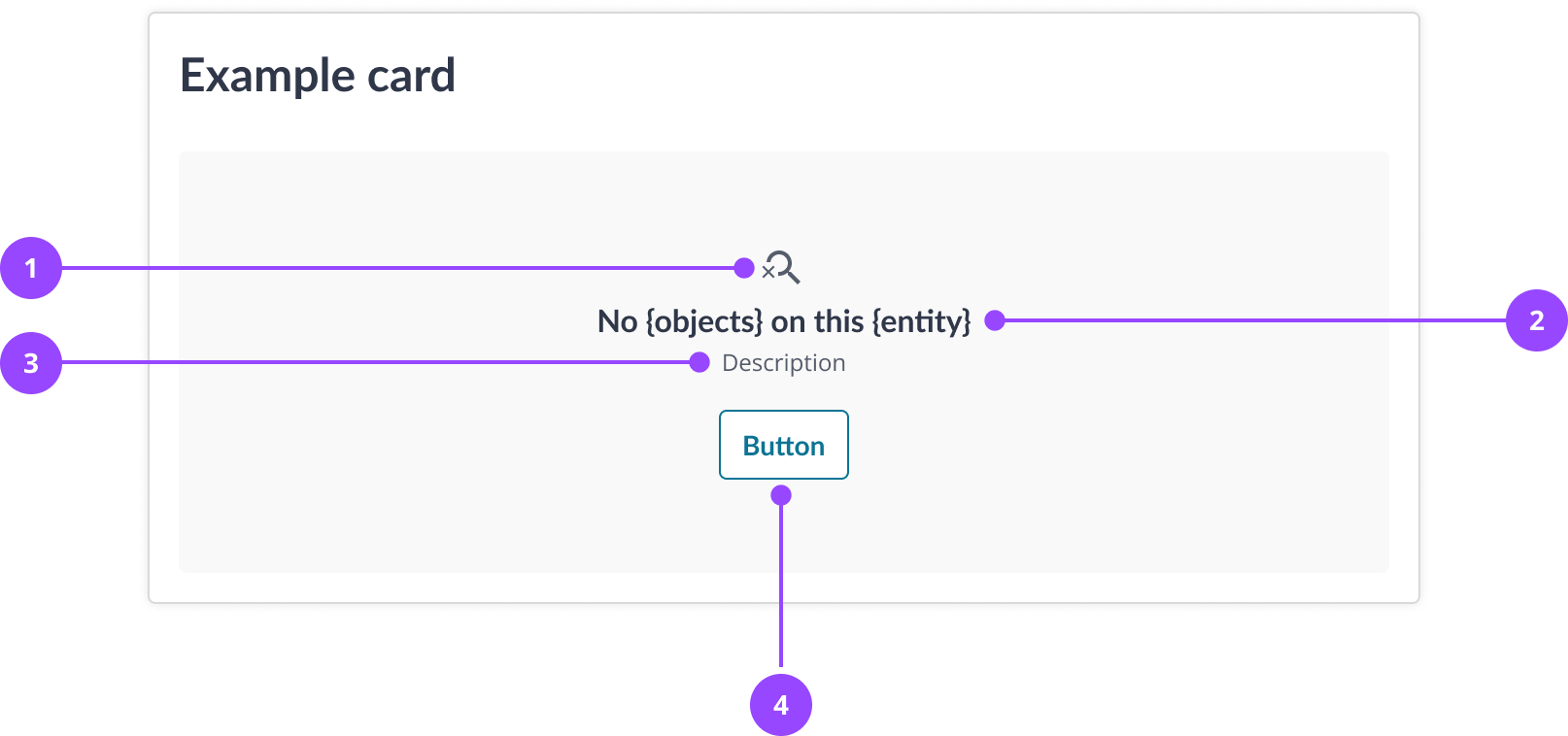
- Icon
- Title
- Description
- Action
Basic usage
Edit live code
<EmptyState
  title="No bills on this account"
  description="The first bill hasn't issued yet"
/>
Variants and features
With action
An action gives users a direct path to resolve the empty state, for example adding the first item to an empty list or clearing a filter that returned no results.
Only include an action when it directly addresses the reason for the empty state. If completing the action would not populate the space, do not include it.
Edit live code
<EmptyState
  title="No meter reads on this meter"
  description="Submit the first reading to start tracking usage"
  action={{
    label: 'Submit meter read',
    onClick: () => alert('Submit meter read clicked'),
  }}
/>
Content
Title
Every empty state must have a title. Use one of these two patterns:
- For empty datasets: "No [objects] on this [entity]", for example "No meter reads on this meter" or "No transactions on this account"
- For search or filter results: "No [objects] found for this [search/filter]", for example "No accounts found for this filter"
The word "found" in the second pattern makes it clear the system searched successfully but returned no results.
Description
Descriptions are optional. Use them to explain why the space is empty or what the user can do next. Keep to a single sentence. Do not repeat or paraphrase the title.
Action label
Action labels should be specific and direct. Write them as a verb followed by the object, for example "Add transaction" or "Clear filters". Avoid generic labels such as "Get started" that do not describe what happens next.
usage
- EmptyState must include a titleThe title is the primary explanation of why the space is empty. Without it the component renders an icon with no context.Copy rule ID for emptystate.title-required
- EmptyState must not be shown while data is still being fetchedShowing an empty state before data has arrived misleads the user into thinking no data exists. Use Skeleton Loading for in-progress fetch states.Copy rule ID for emptystate.not-for-loading
- EmptyState must not be used to communicate a system error or an action that has failedEmpty states communicate absence of data, not failure. Use a Notification with the error variant for errors that require user awareness or action.Copy rule ID for emptystate.not-for-errors
- EmptyState must not be used to represent a null or missing value within a populated list or tableA full empty state component in a cell creates disproportionate visual weight. Use a short phrase such as "None" or "Not applicable" inline instead.Copy rule ID for emptystate.not-for-null-cells
content
- EmptyState icon will always render the search-empty icon. The icon is hardcoded and cannot be changed via propsCopy rule ID for emptystate.icon-fixed
- If an action is providedEmptyState action must directly address the reason for the empty stateAn action that does not help the user populate the space is disorienting. Completing it leaves the user back at the same empty state. If there is no relevant action, omit the action entirely.Copy rule ID for emptystate.action-relevance
- EmptyState description must not repeat or paraphrase the titleThe description should add new information, such as why the space is empty or what the user can do. Repeating the title wastes space and delays the user.Copy rule ID for emptystate.title-no-repetition-in-description
- EmptyState icon must not be replaced or removedThe search-empty icon is hardcoded and cannot be changed via props. Attempting to override it by other means creates inconsistency across the platform.Copy rule ID for emptystate.no-custom-icon
- EmptyState title should follow one of the two standard patterns. "No [objects] on this [entity]" for empty datasets, or "No [objects] found for this [search/filter]" for no-results states.Consistent patterns help users quickly identify the type of empty state and what they can do next. The word "found" in the search pattern signals that the system ran successfully but returned nothing.Copy rule ID for emptystate.title-pattern
- EmptyState description should be a single, concise sentenceEmpty states appear in limited space and must be read quickly. Multiple sentences suggest the content belongs elsewhere.Copy rule ID for emptystate.description-single-sentence
- If an action is providedEmptyState action label should use a specific verb followed by the object, for example "Add transaction" or "Clear filters"Generic labels such as "Get started" or "Try again" do not tell the user what will happen when they click. Specific labels set accurate expectations.Copy rule ID for emptystate.action-label-verb-object
EmptyState
| Name | Type | Default | Required | Description |
|---|---|---|---|---|
title | string | — | Yes | Text explaining that there is nothing to show. Rendered as bold text, not as a heading element. |
description | string | — | No | Supporting text shown below the title, for example how to resolve the empty state. |
action | EmptyStateAction | — | No | Renders a secondary button below the message, for a next step such as clearing filters. Takes a `label` for the button text and an `onClick` handler. |
Styles
title
font-weight: ${fontWeights.bold};
font-size: ${responsiveFontSizes.level4[0]};

${mediaQueries.smallAndUp} {
  font-size: ${responsiveFontSizes.level4[1]};
}
description
font-size: ${responsiveFontSizes.small[1]};
margin: 0;
container
display: flex;
flex-direction: column;
align-items: center;
gap: ${space[1]};
empy-state-container
padding: ${space[12]} ${space[4]};
background-color: ${colors.canvasMuted};
border-radius: ${radii.standard};
gap: ${space[4]};
text-align: center;
In brief
Empty State is a div with an icon, a bold title, an optional description and an optional button. The title is text, not a heading, and nothing announces the Empty State when it appears.
What Nebula provides
- The icon is hidden from screen readers, so the title and description carry the message.
- The action is a real button, with a visible focus ring.
Keyboard behaviour
The Empty State is not a tab stop. When it has an action, the action is a button, reached with Tab.
Interactions
- Tab - Moves focus to the action button
- Enter or Space - Runs the action
Accessible design
Say what is missing in the title, not in the icon
The icon is hidden from screen readers, so a screen reader user hears the title and description and nothing else. Write them so they stand alone: "No bills found for this filter".
WCAG: 1.1.1 Non-text Content
Name the action after what it does to the empty list
A button that says "Clear filters" or "Add transaction" makes sense read on its own, which is how a screen reader user meets it.
WCAG: 2.4.6 Headings and Labels
Accessible development
If the Empty State replaces results after a search or filter, announce that nothing was found
Empty State has no role and no live region, so a screen reader user is not told the results changed. Announce it in a status message, for example "No bills found".
WCAG: 4.1.3 Status Messages
If the title needs to be a heading, add the heading yourself
The title is rendered as bold text, not as a heading element, so it does not appear in the page outline. Add a heading above the Empty State where the page needs one.
WCAG: 1.3.1 Info and Relationships
If the action removes the Empty State, move focus to the refreshed content
The action button leaves the page with the Empty State, and focus is lost. Send it to the results or the filter instead.
WCAG: 2.4.3 Focus Order
Accessibility testing status
Reviewed on 9 October 2026 against v17.0.1.
| Test | Status | Tested with |
|---|---|---|
| Default state | Tested | axe-core via the Storybook test runner (CI) |
| Advanced states | Partially tested | axe-core via the Storybook test runner (CI) |
| Keyboard navigation | Partially tested | keyboard (reported by the owner) |
| Screen reader | Partially tested | VoiceOver with Chrome (reported by the owner) |
What these tests and statuses mean
The table records which checks were run on this component on its own. It is not a statement of WCAG conformance, and it does not cover how the component is used.
The tests
- Default state: The component as it first appears, before anything is clicked or changed.
- Advanced states: Every other state and variant: error, open, selected, each size and style, and hovering.
- Keyboard navigation: Whether every function can be reached and used with the keyboard alone, with a visible focus ring.
- Screen reader: Whether a screen reader announces what is on screen correctly: the name, the role and any state.
The statuses
- Tested: Every check in this row passed in an automated run that repeats on every pull request.
- Manually tested: Every check in this row was run once, by a person or with a tool they started, and all of them passed. It is not re-run on every change.
- Partially tested: Some checks in this row were run once and passed; the rest are still to do.
- Issue found: A check in this row failed. The ticket is shown beside the status.
- Not tested: No check in this row has been run yet.
- Not applicable: This row does not apply to the component, for the reason given beside it.